I started describing broken things around my apartment to an AI agent, letting it write the parametric Swift, and printing the result. My house has a git history now.
It started with a pull-up bar that kept threatening to fall off the wall.
The honest fix was a small plastic support plate. I could have bought one, or opened a CAD program and spent an evening dragging splines around with a mouse. Instead I did the thing I always do when faced with a physical problem lately: I described it to a coding agent and let it write Swift.
Describe it, don’t draw it
I model in Cadova — a Swift library where a 3D object is just code. I stumbled on it in a Hacker News thread, and as a Swift person the idea of defining a physical part instead of sketching it was immediately too good to ignore. The agent writes geometry, Xcode auto-compiles it, Cadova Viewer renders it live, and I 3D print the result.
That turns out to be a perfect match for working with an AI agent, because the whole loop is language. I don’t drag a fillet to 3mm; I describe the part and the agent writes it out as geometry that reads exactly like building the thing in your head: start with a solid, cut away what you don’t want.
❯ Create a bracket body measuring 40×30×8, then drill a 4.2mm bolt hole straight through it.
What the agent writes:
Box(x: 40, y: 30, z: 8)
    .subtracting {
        Cylinder(diameter: 4.2, height: 30)
    }
And I don’t always type the brief. Today’s agents are multimodal, so half the time the fastest path is to scribble the part on a scrap of paper — “this hooks here, this lip catches there” — snap a photo, and hand that over. The agent reads my terrible drawing better than I can explain it in words.
Concretely, the agent isn’t a chat window I copy-paste out of. I run it right inside the project — I’ve used both Claude Code and Codex, and both handle Cadova well — so it edits the .swift model file directly. Xcode auto-compiles on save and Cadova Viewer refreshes the render. The whole handoff is just I talk → the agent writes the Swift → Cadova Viewer shows me the part.
The real superpower is that it’s just code
Here’s the bit I want to actually sell you on — and it isn’t parametric modeling on its own. Onshape, Fusion, OpenSCAD all drive a model from variables; that part isn’t new. The difference is that here the model is plain Swift in a file, so every meaningful dimension is just a named value:
let legDiameter = 60.0   // IKEA Beddinge leg
let lipHeight   = 20.0
let screwDiameter = 8.5
Change 60.0 to 38.0 and the same bracket now hugs a completely different chair leg — every dependent face, the wrap radius, the bolt spacing, all recompute. “Make it fit the other one” is a one-line edit, not a remodel.
This is that bracket — the one that wraps a 60mm IKEA Beddinge leg, with the two counterbored bolt holes and the shelf lip. Drag it around:
The Beddinge bracket, straight from the Swift. Drag to rotate.
This is where it stops being “3D printing” and starts being software. I tweak a number, Cadova Viewer redraws instantly, I eyeball it, tweak again — ten versions on screen before I commit one to the bed. Version control, a git diff that shows me the lip got 4mm taller, the whole toolbox I already use for code, pointed at a thing that’ll sit on my shelf.
- Describetext or a sketch
- Agent writesparametric Swift
- Live renderCadova Viewer
- Print+ real notes
tweak a number — most loops never reach the printer
And there’s a gear beyond tweaking one number at a time. Because the model is a real programming language, not a panel of sliders, it can compute itself — derive a bolt pattern from the part’s width, loop out a row of identical ribs, or stamp a whole family of sizes in a single build:
for legDiameter in [38.0, 50.0, 60.0] {
    bracket(for: legDiameter)   // three parts, one run
}
That’s the line a GUI CAD never quite crosses. And since the project is just Swift, it doesn’t have to live in Xcode at all: it can be a tiny macOS command-line program that takes arguments and writes STL files. The thing I design in and a parts generator I can call from a script are the same code.
The buddy gets it wrong, and that’s fine
The agent gets the idea right almost every time. The physical world then disagrees with both of us — and that part no parameter can shortcut.
I keep a PROJECTS.md next to the code, a changelog for my apartment. The entries read less like documentation and more like bug reports filed against reality:
Pull-Up Bar Support — Works with IKEA screws (4mm). Chamfer should be bigger, distances are fine. Had to print two to make it work.
The agent is brilliant at geometry and completely useless at knowing that PLA shrinks a hair and a 4mm hole wants to be 4.2mm. That’s my job. We’re a team. I’m the one who sands things and swears.
Here’s that twice-printed plate:
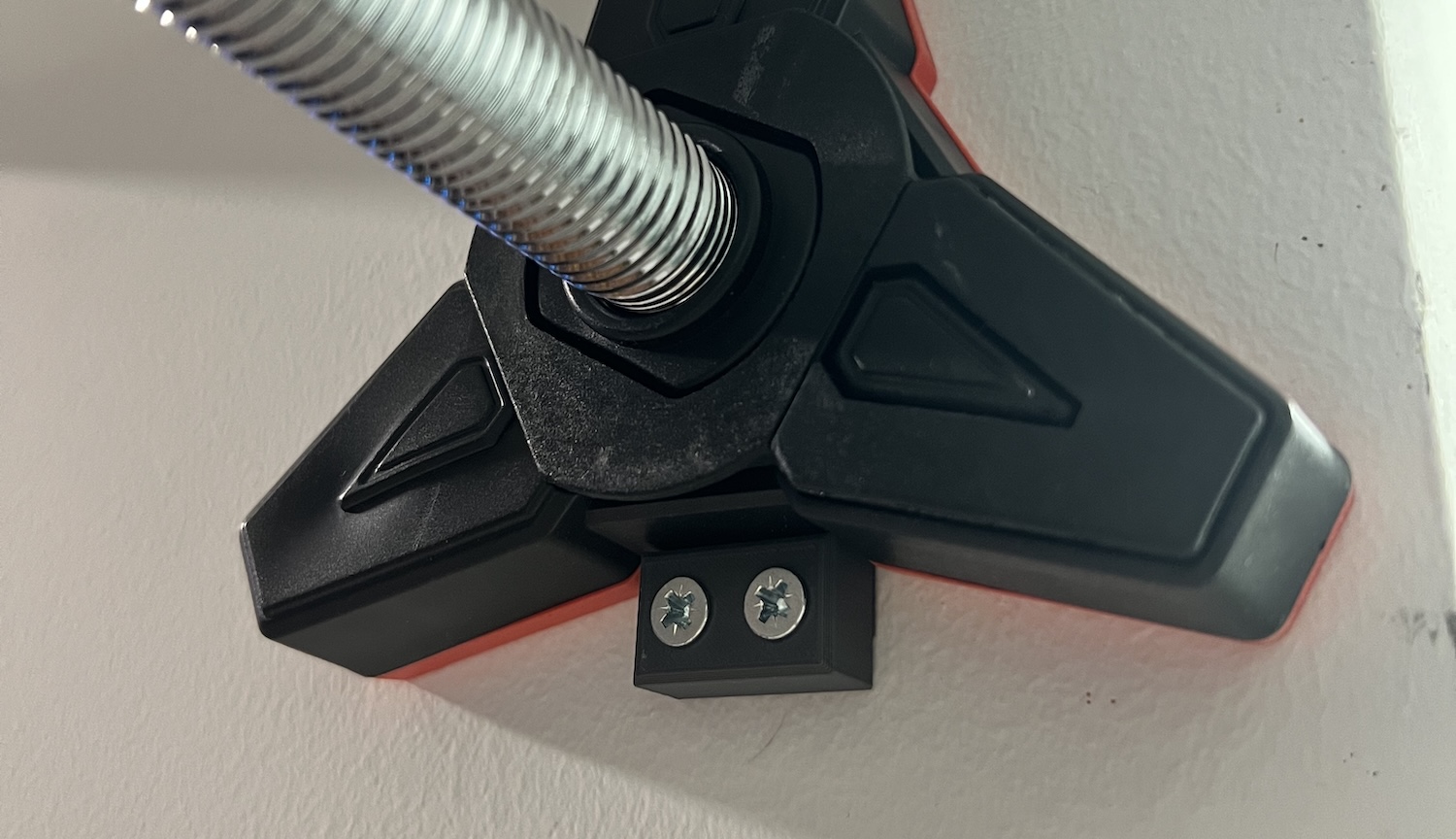
The pull-up bar support, version two. The first one taught us about chamfers.
What we’ve made so far
Once the loop clicked, it became the default answer to small household annoyances — a buckle for a backpack strap that snapped, a hook mount for a Quechua dynamo lamp, and a steady trickle of others.
And then there’s the alignment ruler — an L-shaped tool with raised guards for squaring up prints and paper. That one wasn’t my idea: my wife asked for it. Which I’m counting as a quiet milestone, because a 3D printer earns its corner of the flat the day the other people in the house start requesting things from it.
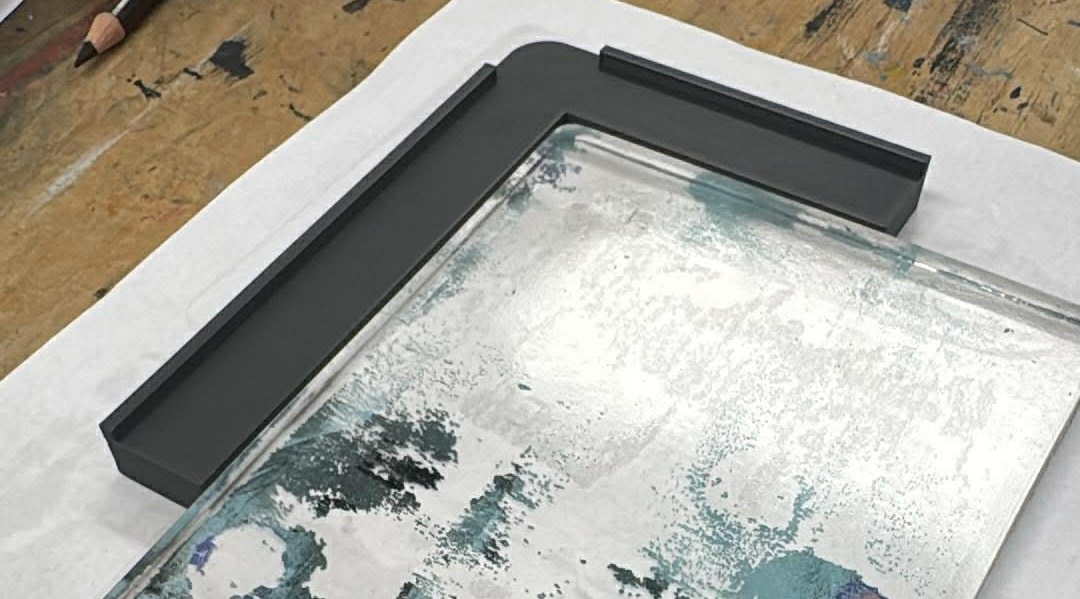
Spousal feature request, shipped. The printer has tenure now.
And sometimes it’s just for the joy of it
Not everything earns its place by being practical. We were playing The Legend of Zelda on the Switch one evening and the kids asked if I could make the Sheikah symbol. So I took a cleaned-up SVG, embossed it onto a 50mm coin, and printed it:
Import(svg: sheikahSymbol)
    .scaled(0.28)
    .extruded(height: 0.5)
    .translated(z: coinThickness)
There’s a small backstory there. Exporting a clean STL straight from Cadova was something I asked the creator about — and he shipped it within days. That’s the other quiet joy of building on a young, sharp open-source tool: you mention a gap, and a week later it’s just there. The coin exists partly because someone said yes that fast.
It does nothing. It sits on a shelf. The kids love it.
When the cost of turning an idea into a physical object collapses, you stop reserving the effort for things that are “worth it.” You just make stuff. My house has a git history and a junk drawer’s worth of plastic that didn’t exist a year ago — most of it described to a robot before lunch.
Want to try it?
If a printer and a Swift compiler are within reach, you can be making your own brackets this afternoon:
Start here: PlaygroundCadova — my own setup, ready to clone. Open it in Xcode, build, and Cadova Viewer renders as you go. It also carries my full
PROJECTS.md— the changelog of everything in this post, real-world notes and all.The library: Cadova — the Swift CAD library that does the actual work. Star it; tomasf deserves it.
Make your agent fluent:
npx skills add ldomaradzki/skillsdrops in the Cadova skill so Claude Code or Codex writes idiomatic geometry from the first prompt.
Build something useless. Then build something your spouse asks for. That’s the whole arc.